Help & support

Go from searching to booking in one seamless experience.
Explore and compare travel options, with your available CommBank Yello points and travel credit balance displayed so you know what you have to use.
Then book with your saved CommBank card and traveller details, making checkout quicker and easier.
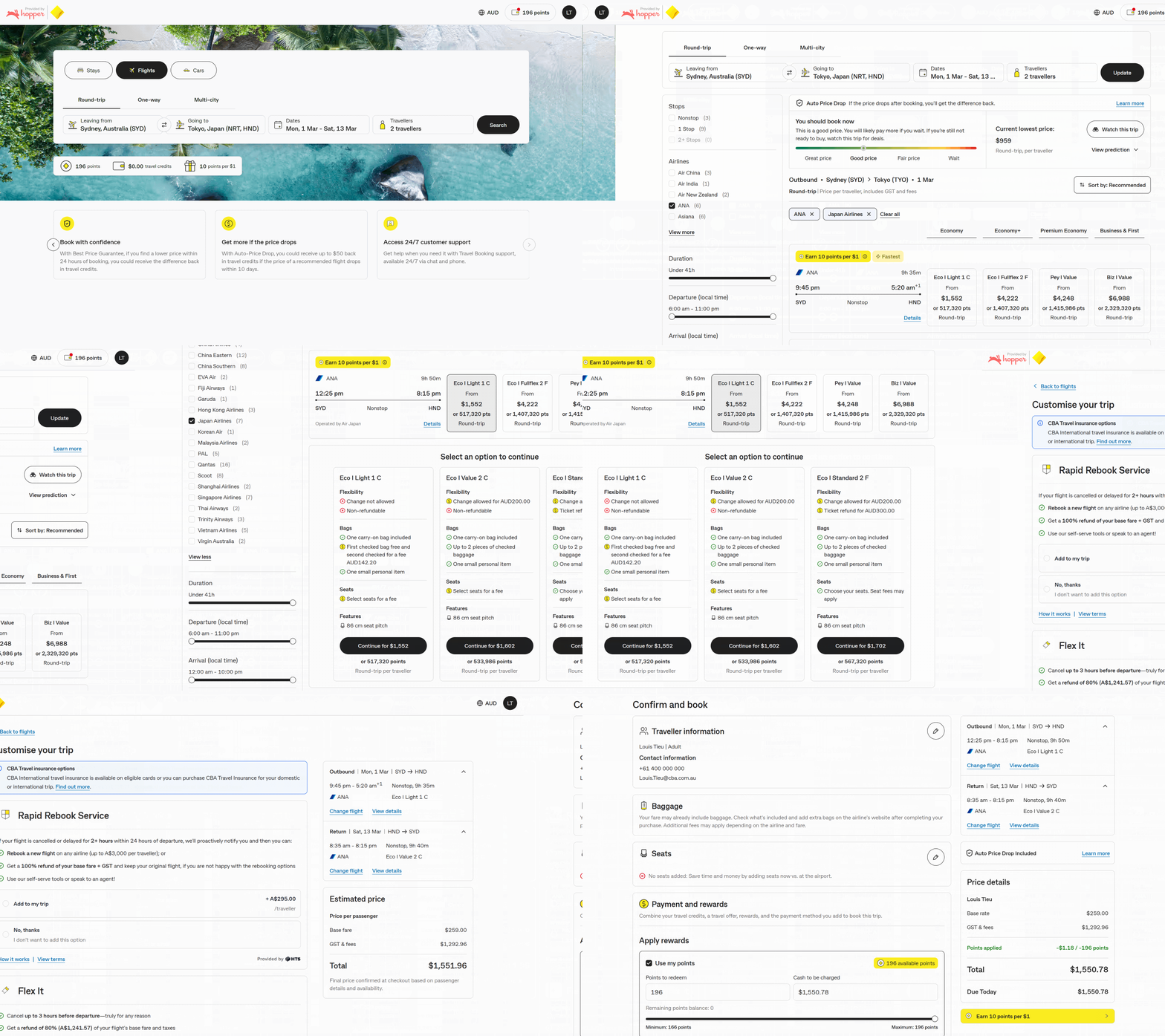
Earn CommBank Yello points across flights, hotels and car bookings*
Redeem CommBank Yello points to pay for all or part of your bookings†
With Best Price Guarantee, if you find a lower price within 24 hours of booking a flight, you could receive the difference back in travel credits1
Get help when you need it with Travel Booking Customer Support, available via live chat or phone
Discover some of the ways Travel Booking can help you plan and book with ease.
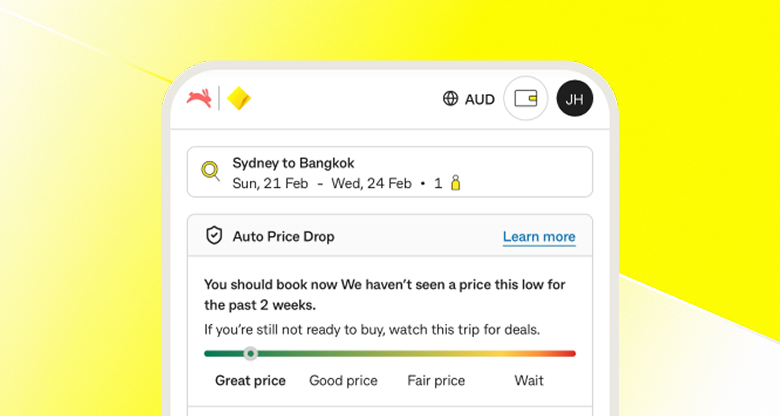
Get help deciding when to book
AI-powered Price Prediction helps you decide whether to book your flight now or wait for a better price1
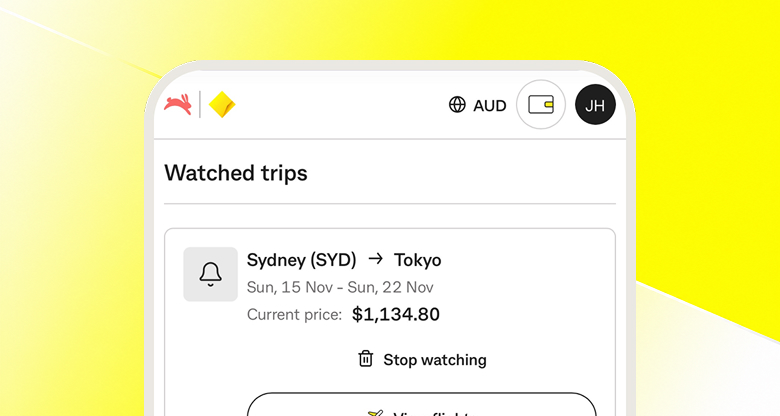
Keep an eye on flight prices
Price Watch tracks flights 24/7 and notifies you when the price drops or it may be the right time to book1
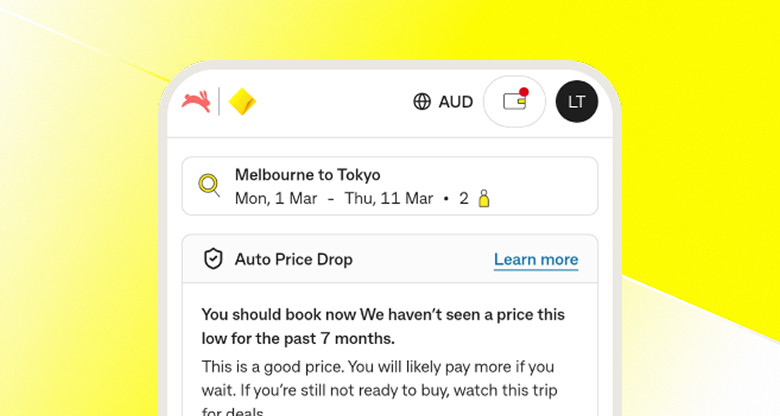
Get more if the price drops
With Auto-Price Drop, you could receive up to $50 back in travel credits if the price of a recommended flight drops within 10 days1
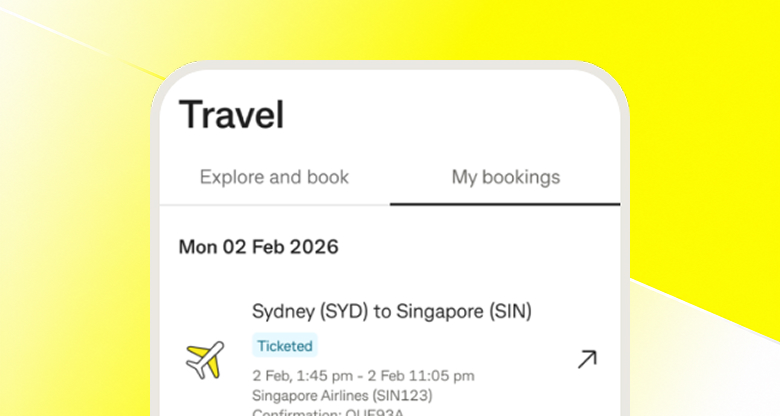
Manage your bookings with ease
View and manage your bookings via the CommBank app or NetBank, whenever you need them
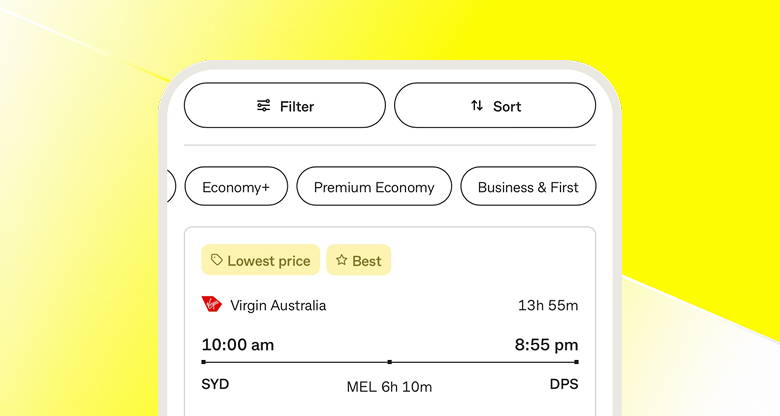
Find it faster
Filter and sort travel options based on what matters to you, with helpful tags like “Best”, “Lowest Price” and “Fastest” to help you choose1
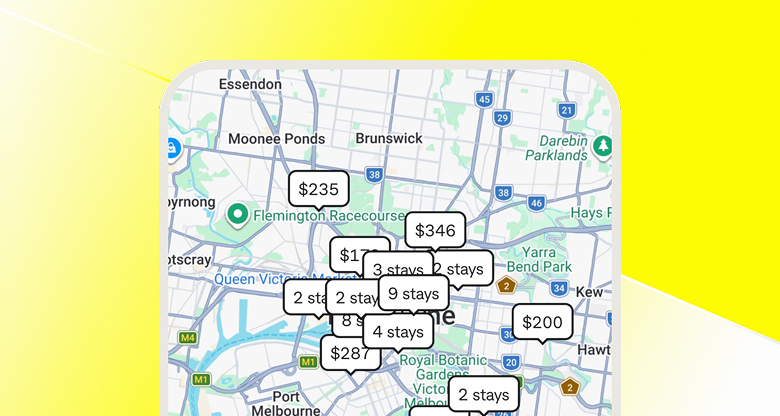
Find the right spot
Explore hotels on a map to see what’s nearby and find a location that works for your trip
CommBank Yello customers can earn and redeem points when they book with Travel Booking.
Not a CommBank Yello customer? Find out more



Use your points to pay for all or part of your booking, then pay any remaining balance with an eligible CommBank card and/or travel credits.†
See what your points could get you -
Sydney to Queenstown
One-way Economy Flight#
Oakwood Premier Melbourne
1 night stay#
$150 off
your next booking#
#Illustrative example only. Advertised price based on historical customer bookings made through the Travel Booking platform between 21/03/2026 and 21/09/2026. Hotel advertised price calculated from the average price per night made at the specified hotel. Prices, availability and redemption values are subject to change and may not represent peak periods (eg. Weekends, Public Holidays, School Holidays). CommBank Yello T&Cs, eligibility and points requirements apply.
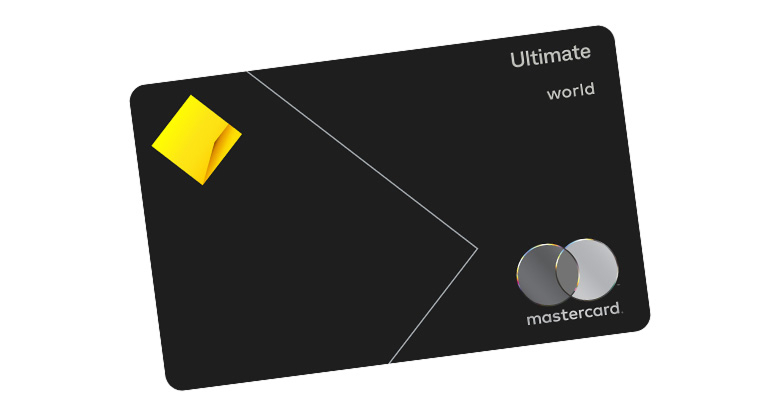
For travel benefits and value

For everyday spending with travel benefits
You can search and book flights, hotels and cars from a wide range of travel providers, including Qantas, Virgin Australia, Qatar Airways, Hilton, Meriton Suites, Avis and Hertz (subject to availability).
There are 300 airlines, over 1 million hotels and over 180 car rental providers.
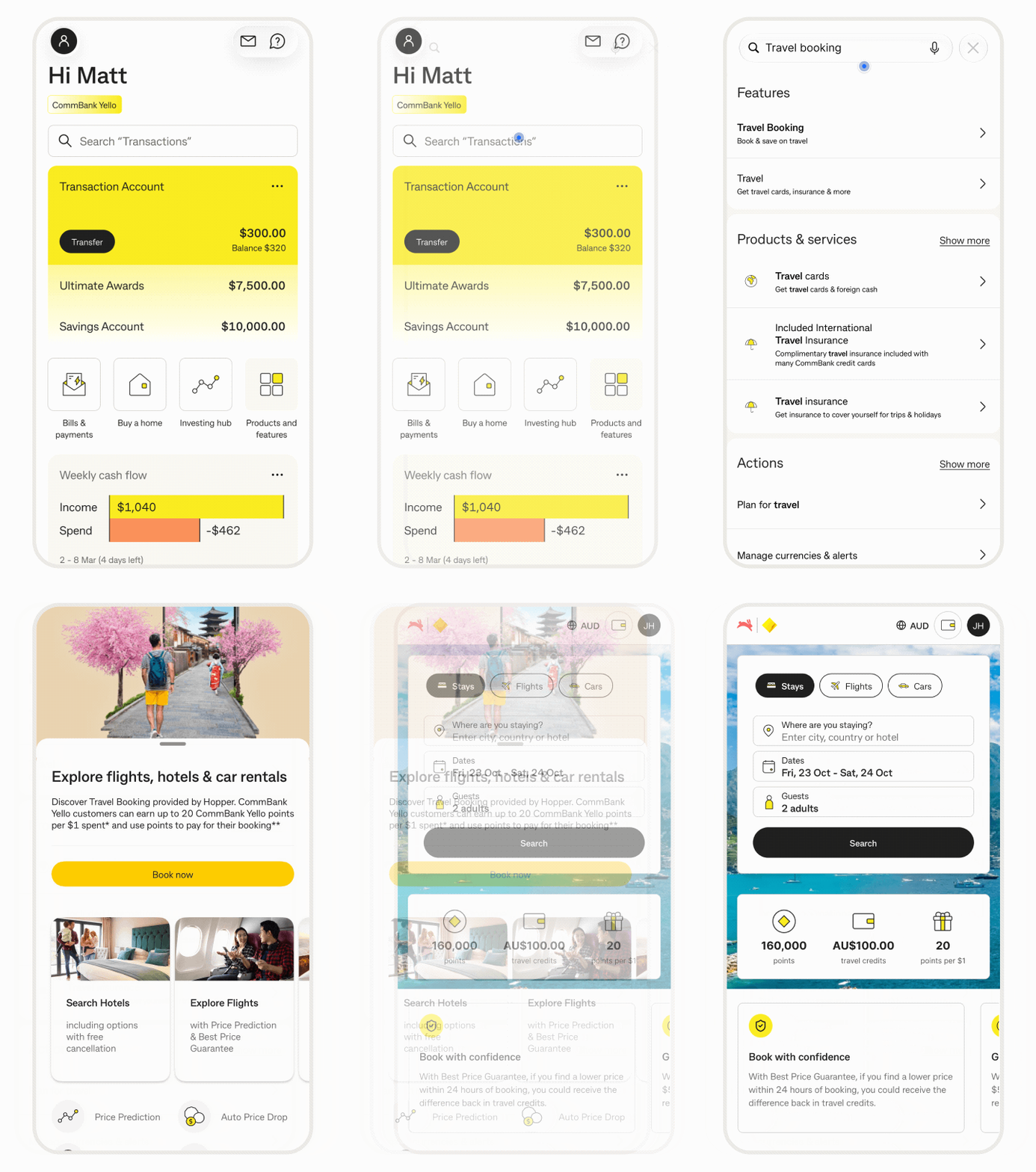
You can pay for your booking using an eligible CommBank card, CommBank Yello points, travel credits, or a combination of these payment methods. For example, use some of your CommBank Yello points and pay the rest with your eligible CommBank card.
To pay with CommBank Yello points, select ‘Use my points’ at checkout, enter the number of points you’d like to redeem or adjust the slider, then click ‘Update’.
To pay with travel credits, select ‘Redeem credits’ at checkout.
An eligible CommBank card is an active retail or business debit card, credit card, StepPay card, or a Travel Money Card.
There are several ways to get help with your booking:
Whether you can change or cancel your booking depends on the type of booking and the provider’s policy.
Flights
You can change or cancel your flight booking, subject to the airline’s policy. Go to Travel Booking, select ‘My Trips’, choose the flight booking, select 'Change booking' or 'Cancel booking' and follow the prompts.
For more information –
Hotels
You can’t change your hotel booking, but you can cancel it subject to the hotel’s policy. To cancel, go to Travel Booking, select ‘My Trips’, choose your hotel booking, select 'Cancel booking' and follow the prompts.
For more information –
Cars
You can’t change your car booking, but you can cancel it subject to the car rental’s policy. To cancel, go to Travel Booking, select ‘My Trips’, choose your car booking, select ‘Cancel booking’ and follow the prompts.
For more information –
We will notify you about the flight change or cancellation via email. It is important to review the details provided as it may require a response from you.
If your departure is within the next 72 hours, we will attempt to reach you by phone and email.
If you are at the airport, start by speaking with an agent at the airline counter. If you still need assistance after talking to the airline, reach out to Travel Booking Customer Support via Live Chat or call (+61) 1300 851 809 (toll free) and have your booking number ready.
You can earn rewards from airline frequent flyer programs. Make sure your frequent flyer details are added to your Traveller List before completing your booking.
At checkout, select ‘Add new traveller’. Under ‘Frequent flyer programs’, select ‘Add frequent flyer’ and enter your details. Your traveller details will be saved to your Traveller List for future bookings.
You can also add or update frequent flyer details for a previously saved traveller by clicking the pencil icon next to the traveller's name at checkout.
Hotel and car rental loyalty programs depend on the provider’s terms and conditions. Check with the provider before booking to confirm eligibility.
You’ll lose access to Travel Booking and forfeit any remaining travel credits.
If you have an existing booking and require support, you will need to call Travel Booking Customer Support on (+61) 1300 851 809 (toll free) and have your booking number ready.
Hopper is a global travel technology company that provides Travel Booking for CommBank customers.
Hopper has helped over 75 million travellers save and provides travel services for major banks around the world, including Capital One in the US, Lloyds Bank in the UK and Royal Bank of Canada in Canada.
Travel Booking is available through the CommBank app or NetBank.
CommBank Yello points for booking through Travel Booking Terms and Conditions
If you’re a CommBank Yello customer, you could earn CommBank Yello points at the following standard earn rates:
Points earned are per $1 spent on the amount paid after any points or Travel Credits have been redeemed.
CommBank may, from time to time, offer higher CommBank Yello points earn rates for eligible spending on Travel Booking than the earn rates described above. We will communicate the higher earn rates, the period for which they apply and any additional conditions on our website or through other digital channels, including via the CommBank App. The higher earn rates will apply instead of the relevant earn rates for the specified period.
CommBank Yello points are typically paid within 31 days of your booking. Occasionally, this may take longer. CommBank Yello points will appear as “Travel Booking - Hopper” in View Activity.
If your booking is cancelled, refunded or modified after points are paid, we’ll readjust your points balance.
CommBank may vary or withdraw this earn rate offer:
We may also vary or withdraw a higher earn rate offer, acting fairly and reasonably.
There may be tax implications of receiving CommBank Yello points under this Offer. Please check our FAQs available at qar90.com/commbank-yello/faqs for further information or seek independent advice from your accountant or tax adviser.
We will make every effort to provide accurate information on the CommBank Yello website and in other communications about the Program, and to operate our systems and processes consistently with these Offer terms and conditions. However, sometimes errors do occur (for example, due to limitations in our systems and processes). Where that happens, without limiting any rights you may have relating to the error, we may, as appropriate, at a later time but as soon as practicable after the error has been identified, make adjustments to put you in the same or similar position had the error not occurred. To the extent permitted by law, we are not responsible for any inaccuracies or misdescriptions except to the extent caused by our negligence, fraud or wilful misconduct.
These Offer terms and conditions apply in addition to the CommBank Yello Terms and Conditions. If there is any inconsistency, the CommBank Yello Terms and Conditions prevail in relation to Program eligibility and Program rules, and these offer terms prevail in relation to this offer. For further information on program eligibility, refer to the CommBank Yello Terms and Conditions.
*From 1 October 2026 to 30 September 2027, CommBank Yello customers could earn 20 CommBank Yello points per $1 spent on Hotel or Car bookings and 10 CommBank Yello points per $1 spent on Flight bookings through Travel Booking. These promotional earn rates apply instead of the standard earn rates during this period. We may vary or withdraw this offer, acting fairly and reasonably. See Travel Booking Terms and Conditions for other conditions.
†CommBank Yello customers can choose to redeem all or part of their CommBank Yello points for their booking, and with other accepted payment methods under the Travel Booking Terms and Conditions (such as Travel Credits).
You must redeem at least $1 worth of points per booking.
How you redeem points is subject to the CommBank Yello Terms and Conditions and Travel Booking Terms and Conditions.
General Terms & Conditions
1For more information, read the Travel Booking Terms and Conditions.
2While you have an open and active Ultimate or Smart credit card, Travel Credits will be applied to your Travel Booking Wallet within 7 business days of the grant or issuance, but in some cases may take longer, and have a 1-year expiry from the date granted, issued, and/or credited. These travel credits are not transferable or exchangeable for cash. Expiry dates can be viewed in your Wallet & Offers page of the Travel Booking website.
Travel credits are only issued for a card account statement period where the applicable card fee has been charged for that statement period. Where the fee is waived or not charged, no travel credit will be provided for that period, except where the fee is waived by meeting the minimum spend requirement (Smart: $2,000 per statement period; Ultimate: $4,000 per statement period). Travel Credit benefit is subject to change, and removal without notice and at our discretion.
When redeeming these travel credits, the entire value of your Travel Booking Wallet will be applied to pay for all or a portion of the booking amount in a single transaction. If the booking amount is less than the total value of your travel credits, the remaining balance of travel credits will remain in your Travel Booking Wallet for future use.
In the event that you no longer hold an open and active Eligible CommBank Card, you will forfeit all accumulated travel credits.
For full terms and conditions including the features provided by Hopper, and for any capitalised terms used here related to Travel Booking, visit Travel Booking Terms & Conditions.
3How you earn and redeem CommBank Yello points will be subject to the CommBank Yello Program Terms & Conditions including holding an eligible transaction account. You only earn points on eligible transactions (this excludes, for example, BPAY transactions, cash advances, and balance transfers).
4For international cash advances, the cash advance fee will apply.
5To gain access to participating airport lounges, you must register your Ultimate credit card on the Mastercard Travel Pass app or visit mastercardtravelpass.dragonpass.com, to generate a membership QR code and present this along with your boarding pass for validation. You will have two complimentary lounge visits every year, per account, each visit can be used by either the primary cardholder or guest. Guest must always be accompanied by the primary cardholder and cannot use the access on their own. Please note, your lounge access may be blocked if your account is closed, in arrears, reported lost or stolen, or has been blocked by us for any reason. To redeem an offer visit the Mastercard Travel Pass app or mastercardtravelpass.dragonpass.com to select your preferred offer and generate an offer QR code. Present the valid offer QR code to the cashier and redeem the offer. Please note, offers vary by location. For information on accessing lounges, offer locations, a full list of Terms and Conditions and Frequently Asked Questions, visit FAQs at Mastercard Travel Pass.
6Cover is provided by XCover.com, a trading name of Cover Genius Pty Ltd (ABN 43 159 983 598, AFS Licence No. 490058), and underwritten by Allied World Assurance Company Ltd (ABN 54 163 304 907), for Commonwealth Bank of Australia (CBA). Limitations, exclusions (including for pre-existing medical conditions and persons aged 80 years or over) and eligibility criteria apply. You may need to upgrade your travel insurance in order to have a comprehensive or extended level of cover. Before acting on this information you should consider the appropriateness of the product with regard to your personal circumstances.
See the Card Insurances Combined Product Disclosure Statement & Financial Service Guide and Card Travel Insurance TMD (PDF) for details.
For purchasable Travel Insurance, see Travel Insurance - Combined Product Disclosure Statement and Financial Services Guide and Travel Insurance TMD (PDF).
Commonwealth Bank and its related bodies corporate do not issue or guarantee this insurance. It does not represent a deposit with or liability of either Commonwealth Bank or any of its related bodies corporate. We do not provide any advice on this insurance based on any consideration of your objectives, financial situation or needs. If you purchase an upgrade policy, we (Commonwealth Bank) receive a commission which is a percentage of your premium.
About Travel Booking
Travel Booking is provided by Hopper Inc (Hopper). Hopper is not part of the CBA Group. CBA is not responsible for the content on this portal, nor the provision of any of the services that are offered through this portal. The services offered are subject to the Travel Booking Terms and Conditions. CBA does not guarantee the obligations or performance of Hopper or the services it offers.
All travel products and offers from Travel Booking are subject to availability and can only be booked by a holder of an Eligible CommBank Card.
Eligible CommBank Card means an active CommBank retail or business credit and debit cards, StepPay card or Travel Money Cards.
Customers are responsible for reviewing and accepting the terms and conditions of Hopper Inc. and any relevant provider (e.g. Airline, Hotel, Car company) before confirming a booking.
For more information, read the full Travel Booking Terms and Conditions.
CommBank will receive a portion of the revenue generated from the Travel Booking platform.
Commonwealth Bank of Australia ABN 48 123 123 124 AFSL and Australian credit licence 234945.